
Guru Support Desk


FREE
Guru Support Desk gives you a complete customer support system directly inside WordPress. Manage tickets from the dashboard or front end, assign Support Agents, reply by email, add internal notes, handle attachments, manage CC participants, and keep every conversation organized. Built for businesses that want professional support without relying on a separate help desk platform, Guru Support Desk keeps everything inside your WordPress website. With email ticket creation, SMTP and IMAP support, AJAX-powered management, customer ticket history, and a clean interface, your team can deliver fast, organized support.
GO PRO!
Guru Support Desk: Professional Customer Support for WordPress
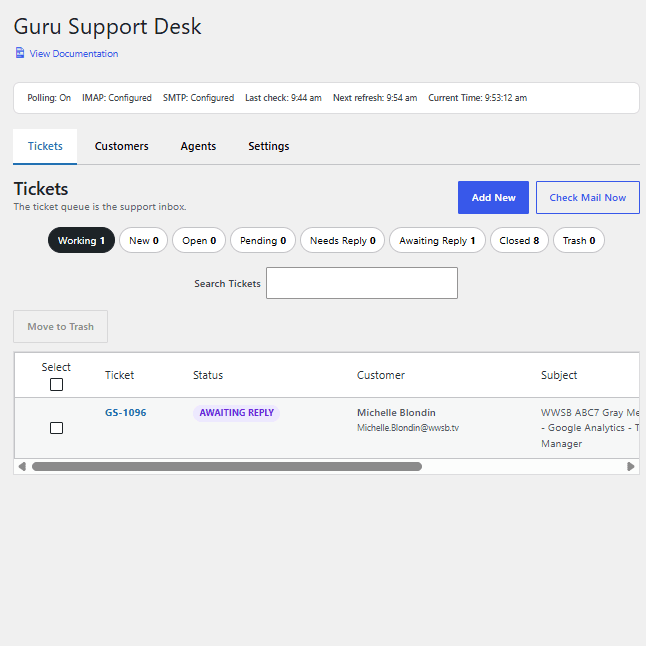
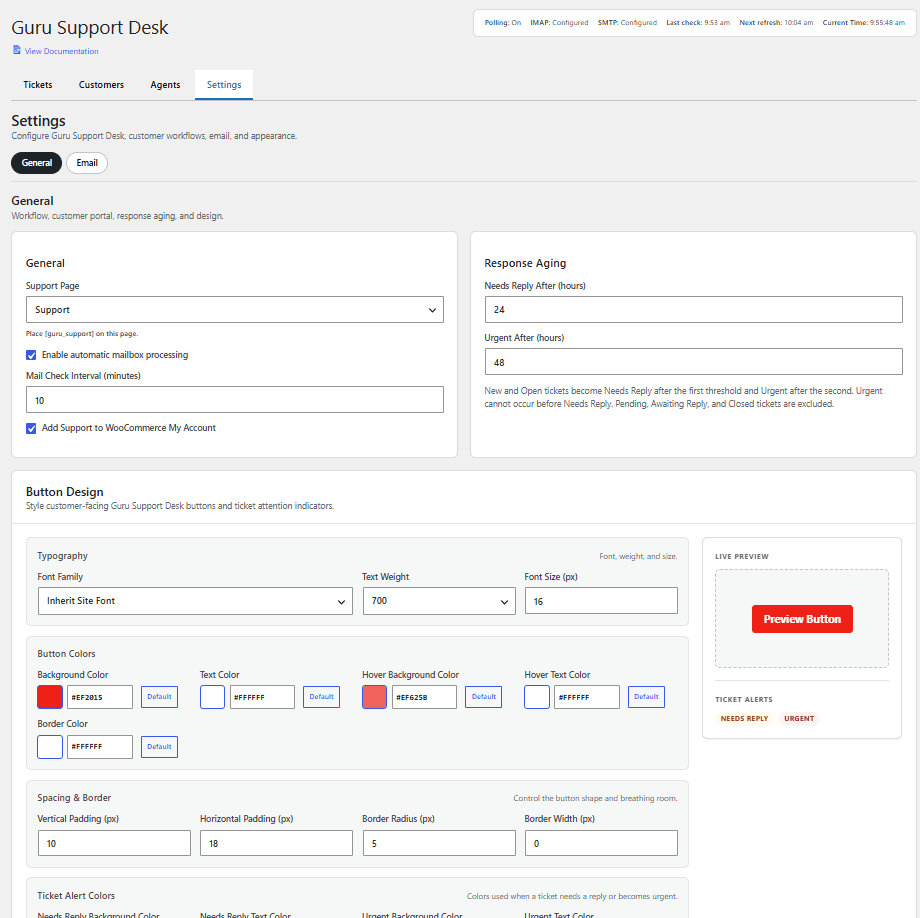
Turn your WordPress website into a complete customer support ticket system with Guru Support Desk. Manage support requests, assign Support Agents, reply by email, track ticket statuses, add internal notes, handle attachments, manage CC participants, and keep every conversation organized from inside WordPress. Guru Support Desk is built for businesses that want professional support without depending on a separate help desk platform. Customers can submit and manage tickets from the front end, while Support Agents can work from the WordPress dashboard or a dedicated front-end Agent support desk with the tools they need to respond quickly and stay organized. Features 🎫 Complete Ticket Management Manage support tickets with organized statuses including New, Open, Pending, Needs Reply, Awaiting Reply, Closed, Working, and Trash. 👥 Support Agent Management Assign WordPress users as Support Agents and manage ticket assignments so your team always knows who is responsible for each conversation. 🖥️ Front-End Agent Support Desk Support Agents can manage tickets directly from the front end with the same core ticket functionality available in the WordPress dashboard. 👤 Customer Support Portal Give customers a clean front-end support area where they can open new tickets, view existing conversations, and follow the progress of their support requests. 📧 Email Ticket Creation Connect your support mailbox with IMAP so incoming customer emails can automatically create new support tickets. ✉️ Reply by Email with SMTP Send professional ticket replies through your configured SMTP account while keeping conversations properly threaded. 🔄 Automatic Email Threading Guru Support Desk uses ticket references, message IDs, and ticket numbers to keep incoming email replies connected to the correct support conversation. 👥 CC Participants Add CC participants to tickets and include them in support conversations when needed. Existing CC participants are available directly inside the reply composer. ✅ Flexible CC Selection on Replies Support Agents can choose whether a reply goes only to the primary customer or also includes selected CC participants. Existing CCs are selected by default, with convenient Select All and Unselect All controls. ➕ Add CCs While Replying Need to bring someone else into the conversation? Add a new CC participant directly while composing a reply and keep them associated with the ticket for future responses. ↩️ CC Reply Handling When an approved CC participant replies by email, Guru Support Desk recognizes the sender and adds the response to the existing ticket without changing the primary customer. 🔒 Secure Participant Validation Only the primary customer and recognized CC participants can reply into an existing ticket, helping protect ticket conversations from unauthorized email senders. 💬 Internal Notes Add private notes for your Support Agents without sending anything to the customer or CC participants. 📎 Attachments and Inline Images Handle customer and Agent attachments inside ticket conversations, including supported pasted and inline images. 📨 Professional Reply Composer Write replies, add internal notes, select CC recipients, update ticket status, reassign Agents, and manage the conversation from one streamlined interface. ⚡ AJAX-Powered Ticket Management Filters, searches, pagination, ticket loading, replies, status changes, assignments, CC management, and other common actions work without unnecessary page refreshes. 🔍 Ticket Search and Filtering Quickly find the conversations you need with ticket search, status filters, queue counts, and organized ticket views. ⏱️ Automatic Mail Checking Guru Support Desk can check your configured mailbox automatically and shows Agents when the next refresh is scheduled. 🕒 Live Ticket Activity Tracking See when each ticket was last updated so your team can quickly identify recent conversations and requests that need attention. 🗑️ Ticket Trash and Restore Move tickets to Trash when needed and restore them later without immediately removing the conversation permanently. 🎨 Front-End Theme Integration The customer portal and Agent support desk are designed to work with your active WordPress theme while using the plugin's own settings for important interface elements such as buttons. ⚙️ Customizable Button Design Control button colors, hover colors, typography, padding, borders, and radius from the Guru Support Desk settings. 🔔 Organized Support Workflow Keep customers, Agents, ticket statuses, email conversations, CC participants, notes, and attachments together in one focused support system. 🧹 No Bloat, Just Support Tools Guru Support Desk is designed around the tools your team actually needs to manage customer support without loading your WordPress dashboard with unnecessary extras. Who’s it for? 🛍️ WooCommerce stores handling customer questions and order support 🏢 Businesses that want their support system inside WordPress 👩💻 Support teams managing shared customer conversations 🧰 Agencies supporting clients from a centralized ticket desk 📧 Businesses that want email and website support working together 🚀 Site owners who want professional support without another external platform Why Guru Support Desk? Keep your entire support operation inside WordPress Manage tickets from the dashboard or front end Receive support requests through your website or email Reply using your own SMTP mailbox Keep email conversations properly threaded Assign tickets to dedicated Support Agents Include and manage CC participants when needed Use internal notes for private team communication Handle attachments and customer conversation history Stay organized with clear ticket statuses and activity tracking Requirements WordPress A configured email account for IMAP ticket retrieval SMTP configuration for sending support replies A WordPress user account for each Support Agent Support your customers. Organize your team. Keep everything in WordPress. Guru Support Desk gives you the tools to deliver fast, professional, organized customer support from the website you already manage.